Moving Home? Avoid the broadband pitfalls

At one point or another, everyone has to move home, and there are various things that need to be planned and issues that can arise when doing so, which can lead to you being without Internet access for weeks on end. This can be problematic when much of our lives rely on being online in one way or another, whether that be for working from home or for keeping the kids entertained with their favourite streamed TV shows or games.
UK broadband provisioning has some quirks around infrastructure, lead times, and contracts that are easy to underestimate. Our own team have experienced some of these issues, so we have updated this guide to explain what to do, when to do it, and what to avoid, with separate considerations for renting and buying.
This isn’t guaranteed to ensure you never see an issue, but hopefully it will help minimise them.
If you have any suggestions on content to add to this guide, please e-mail [email protected].
Understand the UK Broadband Landscape (Before Doing Anything)
Before you commit to buying or renting a new home, it helps to understand how broadband is actually delivered in the UK. We have various guides on this on our website, from our broadband beginners guide to one that explains how fibre broadband works. We’ll recap the basics here as it relates to your choice of property.
You buy your service from a retail broadband provider and this is what you find on our package listing when comparing broadband services (from companies like BT, Sky, TalkTalk, Virgin Media, YouFibre, etc.). These companies use various infrastructure networks which actually run the network (e.g. Openreach, Virgin Media, Netomnia, etc.) – These could be the same company for both (e.g. Virgin Media) or different divisions of the same group (Openreach/BT, Netomnia/YouFibre) but it’s important to be aware of this as retailers sell services from different infrastructure networks.
Key technologies
- FTTP (“Full Fibre”) – Fibre all the way into the property. Best performance, most reliable
- FTTC (“Part Fibre” – VDSL / “Superfast”) – Fibre to the cabinet, copper to the property
- ADSL – Legacy copper-only service from telephone exchange; not widely used anymore
- Cable (Coax/Fibre) – Virgin Media’s network, slowly being upgraded to full fibre
- Wireless / 5G / Fixed Wireless – Backup or rural options
- Satellite – Starlink is the most well known answer used on planes and ships too
Infrastructure ownership
- Openreach – Used by most ISPs (BT, Sky, Zen, Plusnet, etc.)
- Virgin Media – Own network
- Altnets (CityFibre, Hyperoptic, Community Fibre, Gigaclear, etc.) – Often excellent services, but coverage varies within different areas. You may have services from one or more of these, or from none. Sometimes these are retailed by ISPs (e.g. Zen Internet, Sky, etc.)
IMPORTANT NOTE: Availability varies and can even be down to the individual property, meaning your neighbour may be able to receive a broadband service whilst you are unable to order. Our own retail broadband package listings are postcode-based which is generally indicative on what most properties in a postcode can get, but once you’re in the process of making final decisions, you should contact the provider to confirm availability to the property.
Timeline — When to Start
Ideal timeline
- When you think you might be moving — Don’t sign a new 12-, 18- or 24-month contract without checking what happens when you move. Check your existing broadband contract and see what the notice period is, and if you’re in an initial period. You may find that you can move this to a new property, but check what happens if your current provider isn’t able to service your new home. Will they allow you to exit the contract early?
- When you start house hunting — Browse our UK Broadband Map to get an idea of which areas are likely to be good choices and which may be problematic
- Before enquiring about a property — You should check what broadband options are available in the postcode you’re looking at in terms of networks/speed. You could also check with some providers for that specific property.
- Before you make an offer — Ask the seller to confirm what broadband services they use (speed/provider). Check the property-specific availability with a provider you’re happy to use. Make sure anything essential is requested formally via your conveyancer if you’re buying.
- 4–6 weeks before move-in: Re-confirm options (if you have a significant delay between offer and completion/move-in you may find new options that better suit your needs).
- 3–4 weeks before: Place an order when the move date is fixed (if possible)
- 1–2 weeks before: Confirm appointment dates and access arrangements if necessary. You may need to arrange the install for the day after completion (since completion times may vary). Be aware that completion could be delayed in some cases if you are buying.
You should consider who you want to order from and not just take the same service that you currently have or which the current resident uses. A new property may have access to different Altnets to your existing property, even if they are in the same town or road. It’s also worth checking if another ISP offers a better deal than the one you are currently with.
Having a backup plan is also sensible if you rely on your broadband for work. This could be mobile broadband, a Starlink service, or another network in the area. Although we generally don’t recommend sharing your Internet connection with people you don’t know, if you do know a neighbour, you may be able to use their Wi-Fi for a period of time.
Why planning early matters
- Openreach engineer slots can be 2–4 weeks out. This is likely to be required if the property doesn’t have an existing ONT (or you need to move it).
- New FTTP installs can take multiple visits if something unexpected comes up, like blocked ducts
- You may be able to get some installation work completed before you move in if the existing property owner is amenable to this. Also you could require them to cease their service so that you can get your installation scheduled for immediately after you complete a house purchase.
Renting
The above guide is mainly for those buying a property, but you can adapt the key points to rented properties. Don’t expect access before your move-in date generally, however you are likely to be able to identify a provider who can deliver the service quickly. In some rented serviced flats, there may be specific providers who provide managed services which will be easy and quick (but could be pricey), so key is to talk to the lettings agent at the earliest opportunity.
Contract Periods — It can be important to line up your contract period with your expected stay at the property to avoid exit fees when you are looking to move out. This is where a 12-month contract from an ISP can be helpful, although you will likely pay more per month than if you can sign an 18- or 24-month contract. The Renters Right Act 2025 ends fixed term tenancies however you may still have expectations in terms of changing jobs, contract work, etc. that mean you aren’t sure you’ll be staying put for the following 24 months.
Common Pitfalls
When installing broadband deals for renters compared to owned properties, there can be some issues that are more difficult to overcome.
- Assuming permission is automatic
- Drilling, fibre entry points, affixing anything to the building or new ducts may require landlord approval. In flats, this may require the building managing agent (freeholder) to approve before any work can be completed.
- Managing agents may delay or block installs.
- Check if specific networks are available and what services are already live in the building (for flats).
- New-build or recently converted properties
- The address may not exist correctly in systems run by various networks
- Fibre might be installed to the building but not in the individual flat
- There may be limited providers with exclusivity which restricts your choice of providers
- Communal access
- An engineer may need access to risers, basements, or comms cupboards in buildings. Find out how this works and what notice is needed. In some cases for flats, you may need to provide risk assessments, method statements, copies of public liability insurance, etc.
- The managing agent must be informed in advance to provide access.
- Social Housing / Housing Association Properties
- You may need permission from your social landlord as in other cases, but this may be more tricky to receive. We know of examples where Housing Associations have been blocking installs of fibre, without legitimate reasons.
Renting best practices
- Ask the landlord/agent:
- Which provider was used previously?
- Is fibre already installed in the flat?
- Is written permission needed for new cabling?
- It can be helpful to use the existing ISP that was used. Alternatively you could consider an ISP experienced with Openreach escalations.
Buying a Property
When you are buying a freehold property, you have more freedom to approve drilling, ducting, and fibre entry into the property, or digging up the front garden. It may get a bit more complex if your property is a leasehold (most flats and some houses) however.
Buying-specific pitfalls
- Exchange vs completion gap
- Broadband cannot usually be ordered until ownership or occupancy is confirmed.
- Delayed terminations by former occupants could hamper your new install.
- Early ordering risks cancellation if completion slips.
- Empty properties
- Copper lines may be ceased.
- Fibre records may be incorrect or missing.
- ONT may not be present at the property, and a new one may need to be installed.
Leasehold Property Considerations & Private Roads
If you are purchasing a flat, this will often (especially in new builds or large blocks) be a leasehold property. Also some new-build houses are built as leasehold, which means you pay ground rent and possibly service charges for maintenance of common areas. You’re effectively a long-term renter, with a duration of up to 999 years.
If you live on a private road, it’s also possible you may have a freehold property, but access to your premises is through a shared road maintained by a management company who may need to agree if you intend to run any cabling/services to it.
Where you need permission of a third-party to run cabling, you need to investigate what they may require. This could be trivial or very time consuming. Managing agents working for freeholders may restrict who can run ducting/cabling and may only allow one company to do so. You will soon probably have a stronger a right to Gigabit broadband from your freeholder, but this doesn’t mean a choice of providers.
Broadband ordering best practices
Run broadband availability checks before signing contracts to buy a property. The BT Wholesale Checker can give some details of the state of a property currently. If you have the UPRN (Google will help you find sites that can give you the UPRN for an address), then you can put this in and it will tell you if a service is live at the address currently. You may see a response like:
Our records show the following FTTP network service information for these premises:-Single Dwelling Unit Residential UG congested duct.
ONT exists with active service. No spare ports are available. A new ONT may be ordered.
There are two helpful bits of information here. “ONT exists with active service” – this shows that there is a fibre service already live using an Openreach service. You will NOT be able to order a new Openreach service at the address until the existing service has been ceased. Verify that the existing owner or tenant has put in a cease of their service, and ask when this will complete. If it’s after you move in, it’s likely you will need to wait for this to occur before Openreach will allow a new order to be placed.
“UG congested duct” – this indicates that the property is served by underground ducting and that the duct is actually congested. This may mean there is too much cabling or there is a blockage of some sort. This may stop you from getting another service, such as an Altnet installed if they are using the same ducting as Openreach, or it may complicate the install with multiple visits required to clear any blockages and get the service installed. New ducting would similarly require much more work to get installed.
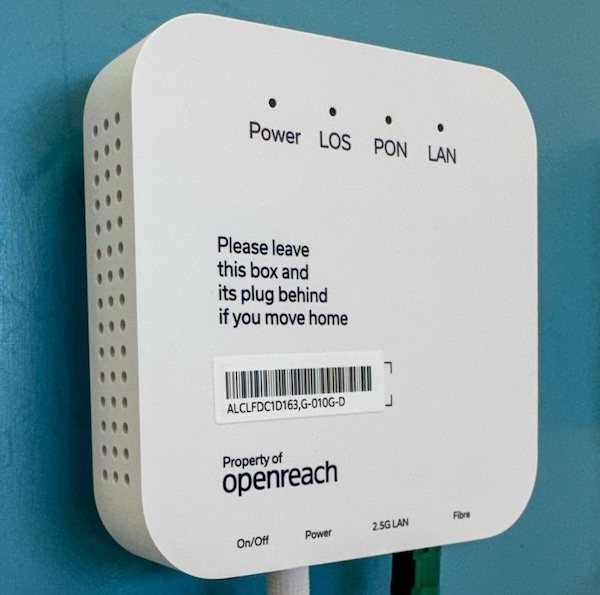
TOP TIP (Full Fibre services) — If your property has full fibre, make sure the previous occupier leaves the ONT (Optical Network Terminal) and the power supply for this. There are various types of ONT (Openreach has some useful diagrams) but these are usually attached to the wall where the fibre-optic cable enters the house and they have a power supply cable. The remaining cable goes from the ONT to your router. In case of some providers like Hyperoptic, they should also leave the router (and there’s often a sticker on the devices to say this). Check with the provider if required. If you’re moving in, talk to the occupier about these to avoid delays.
TOP TIP (Virgin Media) — Virgin Media will often send out a self install pack if their records show the property already has a coax cable from their network running to an indoor location, but if possible double check that the indoor Virgin Media socket is present and has the cable installed If you need an engineer visit, this can add a week or two of delays to getting online.
How to Avoid Being Offline
The golden rule—Never rely on broadband being live on move-in day! If you need to be online for work reasons, then plan another option that you have verified will provide service, e.g. mobile broadband or consider using shared workspaces nearby until your broadband is live at home.
Practical strategies
Think about termination/start dates—If you are not moving out of the old property immediately, keep the broadband active until your move-out date to ensure that you can still get online. This is particularly important if you are remote working.
4G/5G Mobile Data as backup—Check indoor 4G and 5G coverage for all networks at the new address and look at getting a SIM card and mobile broadband router in advance if needed. There are pay-as-you-go or rolling 30-day contracts available to avoid a long commitment. a dedicated router will perform better than tethering to your phone. Also an external antenna may help considerably.
Three offers a ‘Home Broadband‘ service which uses the mobile network and could be helpful if it takes a while to get a fixed broadband option live. They do offer a 1-month service according to their website, although you may need to call them to order this.
Choose ISPs with temporary or backup solutions—Some ISPs offer solutions that have 4G/5G backup routers (e.g. BT Halo 3+) to provide a failover if the fixed-line broadband isn’t working. This can get you online before your fibre broadband goes live, but do check with them in advance that this will work and provide coverage in your area.
Consider Satellite Broadband—If mobile coverage is not great at the new property, you may be able to get online using a satellite-based service such as Starlink. You should plan ahead if considering this, as it can take a couple of weeks to get hardware delivered. Service starts from £55/month, and you can get it without a long-term commitment, but there are upfront costs. Read more in our satellite broadband guide. Also note that the dish needs to be pointed in the correct direction, and you may not be able to do this all cases (especially in flats)
New Builds & Conversions
Newly built properties and conversion of commercial premises can cause problems due to the address not being live in the Openreach database. Other issues include the postcode existing, but plot numbers not all being added or fibre being installed into the building but not being commissioned. This can cause major issues when ordering a broadband service.
Mitigations
- Get the UPRN (Unique Property Reference Number) from the developer or council and provide this when ordering
- Confirm which network was installed (Openreach vs Altnet).
- Expect delays even if the sales office says the property is “fibre-ready”.
In the UK, broadband provisioning can be slow, fragmented, and appointment-driven. The safest approach is to assume delays, plan overlap, and treat mobile data as a viable fallback rather than an emergency measure.
 Test your broadband speed
 Follow us on X for the latest broadband news