Ordering and Installation of Broadband
- I don’t want to use microfilters…
- The online checkers say I may need an engineer visit, why?
- I need an RJ-11 extension lead, where from?
- I’ve heard I don’t need a splitter for the ADSL modem?
- How long an extension can I add?
- Can I use a normal phone extension?
- What is a micro-filter?
- What is an Engineer Assisted Install?
- What is a Self-Install?
- The checker says I am very unlikely to get ADSL, should I bother ordering?
- What speed should I order?
- How do I know which ISP to choose?
- I am trying to order ADSL, but my provider says I have it already, but I’ve only just moved into property?
- I cancelled my previous broadband service, but cannot order a new service due to an incompatible product, what do I do?
- How do I fit an ADSL faceplate to my BT master socket?
- What is the I-Plate?
- Can I fit an I-Plate?
- How do I get an I-Plate?
- How much difference will the I-Plate make to my broadband speeds?
- What is inside the I-Plate?
- What is the Openreach NTE5c a tool-less master socket?
- I don’t want to spend any money, but want to improve my broadband connection?
- I don’t have a master telephone socket, can I fit an I-Plate?
- My main socket has two telephone sockets on it, will an I-Plate fit?
- What is the difference with an Openreach branded master socket?
- My master socket does not have a split front to it, can I fit an I-Plate?
- I have moved home and the telephone is all in my name, but the online checkers say I cannot have broadband?
- The online checkers say a very slow speed is available, but the previous resident got a lot faster?
- My broadband provider is saying I need to pay them money before I can migrate, can they do this?
- I have moved, but my provider is telling me that someone is camped on my line, what do I do?
- How do I find out which broadband provider the previous resident was with?
- I want to change my telephone line rental provider, will this affect my broadband?
- I am moving into a home with no telephone line, and TalkTalk say I have to call BT to get a line installed, won’t this be expensive?
- I want to switch broadband providers how do I do it?
- How quickly should I get my Migration Authorisation Code (MAC)?
- What are the rules governing migrations?
- How do I know if I need a MAC to migrate?
- I think I am on an unbundled connection, can I get a MAC?
- My broadband provider is asking whether I’d like to cease my broadband connection when I ask about migrating, what do I do?
- I have a fully unbundled service, but want to switch broadband providers, what do I do?
- I am moving out of my home and want broadband as soon as possible in my new home, what do I do?
- I have been given my new telephone number, but the availability checkers say my broadband will be very slow?
I don’t want to use microfilters…
If you do not use microfilters, and still want to use a phone then a replacement Master socket cover that filters the ADSL or VDSL2 signal from the extensions is needed.
Filtered faceplates are a lot easier to find today than a few years ago with numerous sellers now listing them on Amazon As there are various versions of faceplate and the curvy 5c version is not compatible with older master sockets (and vice versa) make sure you are buying the correct version.
These companies also offer a variety of extension sockets with built-in microfilters, thus avoiding the need for an unsightly cable tangle. Also locating the DSL modem at the master socket should be the optimal location to avoid losing connection speed, this is more important with VDSL2 (FTTC) than ADSL2+ and will be very critical when G.fast is widely available.
The online checkers say I may need an engineer visit, why?
Almost all broadband orders for ADSL2+ and VDSL2 are self-install, some providers may allow you to add an additional engineer visit, but this usually doubles the set up cost.
As when ADSL2+ and VDSL2 was first rolled out we expect G.fast to come with an engineer visit for the first year or so as Openreach tries to make sure people get the best speeds.
Users applying for a 0.5Mbps or 1Mbps service on a very long line may still see a note about a possible engineer visit. This visit will only occur after the line has been activated and if you are having problems with the service. For example if your ADSL modem will not connect (sync) with the exchange hardware.
If an Openreach engineer does visit as part of a boost and you do not have a modern master socket they will usually install a new openreach master socket, but be warned they do not usually re-wire all your extensions the extra time for that work is likely to be charged to you, so make sure you know what the cost is upfront.
I need an RJ-11 extension lead, where from?
Extension leads with RJ-11 plugs are available from a variety of sources, e.g. Comet, B&Q, Argos, Dixons etc.
Generally online sources are the cheapest. Some of the best cables will be made using CAT5e cable, but this is only necessary if you are having problems with existing wiring. High prices does not always equate to better, so check reviews for the item you are busying.
I’ve heard I don’t need a splitter for the ADSL modem?
You only need a microfilter for your analogue telephones and anything else like a Sky box that is plugged into the phone line. If you do not have any telephones on your line, there is no need for a micro-filter. What you will need is an adaptor for the normal ADSL modem lead to convert the RJ11 plug to a standard BT plug – in the majority of cases your old 56K modem lead will suffice.
How long an extension can I add?
It will vary from location to location. Generally upto 30m of CAT5 cable is fine, longer is possible.
Normal phone extension cabling is fine for the vast majority of ADSL users so long as it is a twisted pair cable (standard name is CW1308), but for those with a low signal to noise ratio they may find using CAT5 twisted pair cabling improves the stability of the line. If installing extensions remember to avoid running them parallel to mains cable and other interference sources.
If you have your line activated and are having problems it is suggested that you unplug all extensions and try the ADSL modem at the test socket that is part of the main BT socket.
Can I use a normal phone extension?
If you are going to put in a new extension, then a normal phone extension kit will be sufficient. There is no need to buy expensive extra high speed type cabling. Always ensure though that the extension is already filtered by a faceplate or you connect the phone via a micro-filter.
What is a micro-filter?
A micro-filter is a special adapter that you need to use on your phone line, so that your telephones do not interfere with your ADSL connection. Some people call them a ‘splitter’, the naming is interchangeable.
What is an Engineer Assisted Install?
Engineer Assisted installations are optional (in most cases) and more expensive. An engineer will visit your premises to connect and configure a supplied modem or router, and answer any questions you may have. Businesses often prefer engineer assisted installations because internal extension cabling is frequently needed.
What is a Self-Install?
Self Install is sometimes described as ‘wires-only’. During the activation phase, you’ll never see an engineer (unless there is a specific problem with your telephone line). Shortly after placing an order with your chosen ISP, you’ll be assigned an activation date, assuming your line passes the required tests (see our Technical FAQ). In the meanwhile, you’ll need to purchase an ADSL modem or router (often available from your ISP). If purchasing a router, ensure that it also includes an “ADSL modem” in it, and isn’t just a broadband router (see our reviews for some examples). After activation, you should be able to connect with the details supplied by your service provider.
The checker says I am very unlikely to get ADSL or VDSL2, should I bother ordering?
The wording ‘very unlikely’ is used to denote those lines that BT Wholesale think are very long, and therefore the chance of it not working is much higher than on average.
It is still worth ordering as until the line is activated you cannot tell for certain whether the service will work. If the line fails to work BT Wholesale will not charge the ISP anything, and any contract is considered void by BT Wholesale. This means your ISP should refund you any money taken in advance if the line does not work at all.
If your immediate neighbours have a working service you can usually get an idea of whether the checker estimate is seriously wrong or on the ball by running a speed test to find out how fast they get. Though due to the vagueries of the phone network there are cases where areas have vary different line lengths and quality so the speed of a neighbour goes not guarantee you will get the same speed.
What speed should I order?
As most people are keen to have reliable video streaming, you need to order a service that will usually support download speeds of 5 Mbps or better. If there are several people in your home multiple the 5 Mbps by the number of people who will be streaming at the same time.
Superfast broadband services are very widely available now, but while the adverts talk of up to 38 Mbps and up to 76 Mbps not everyone will get those speeds, so when comparing providers prices make sure you check their speed estimates for your address. Also pay attention to the upload speeds, gamers who enjoy broadcasting a video stream while they play will need the up to 9 Mbps or faster upload services and not the bargain basement up to 1.9 Mbps providers sell as their entry level service.
VDSL2/FTTC is normally faster than ADSL2+ but this is not always the case, so if your speed predications are down in the sub 3 Mbps type area, you may find that ADSL2+ is more stable compared to VDSL2 and is usually cheaper.
How do I know which ISP to choose?
Choosing the right service provider can be tricky, and often boils down to word of mouth, or ‘gut instinct’. There are many service providers competing for your business so we recommend you use the search on that page reduce the list to a more manageable number of providers to consider.
Remember that if you’re looking for a good personal service, the cheapest products and the largest ISPs are not usually the best choice. Try asking on our Message Boards in the “Which ISP” forum (residential) and comparing providers with our ISP Comparison tool.
I am trying to order broadband, but my provider says I have it already, but I’ve only just moved into property?
This is probably because a previous resident of the property had ADSL or VDSL2 but did not cancel the service, or a broadband provider has not fully removed itself from the telephone line. The problem is often referred to as ‘having a tag/marker on your line’.
This problem is very rare now, and in cases when it does occur it usually resolves itself once all the databases update to reflect the status of the telephone line. Worst case scenario is ordering a telephone service and once that is live you can subsequently order broadband as the update of the telephone records triggers an update to the broadband database.
I cancelled my previous broadband service, but cannot order a new service due to an incompatible product, what do I do?
Ideally if wanting to change service providers you should use the existing migration procedures. Where this is not possible you can cancel a service, and get your new provider to connect you again – this is referred to as a cease and provide.
Sometimes when ceasing (stopping) a broadband service a provider cancels your login but fails to tell the wholesale provider to remove the tag from the line that says you have ADSL already. It is possible for a broadband provider to issue all the correct paperwork, but for the wholesale provider to make a mistake too.
To get the Tag/Marker removed you should chase up with your new broadband provider, whose backroom support staff should be able to help.
How do I fit an ADSL faceplate to my BT master socket?
 Click image for larger version The two short screws when undone will allow you to lift off the bottom half of the socket. Be careful as your telephone extensions are connected to this piece you are removing. |
 Click image for larger version This is a master socket with its faceplate lifted off. ON NO ACCOUNT DISMANTLE THE WALL SOCKET ANY FURTHER. Consumers can change the faceplate but the part screwed to the wall must be maintained by BT. When wiring up telephone wiring also use the proper IDC insertion tool, for home use a plastic one costs around £1. You may have more wires connected, if so this suggests you have more than one telephone extension wired in. |
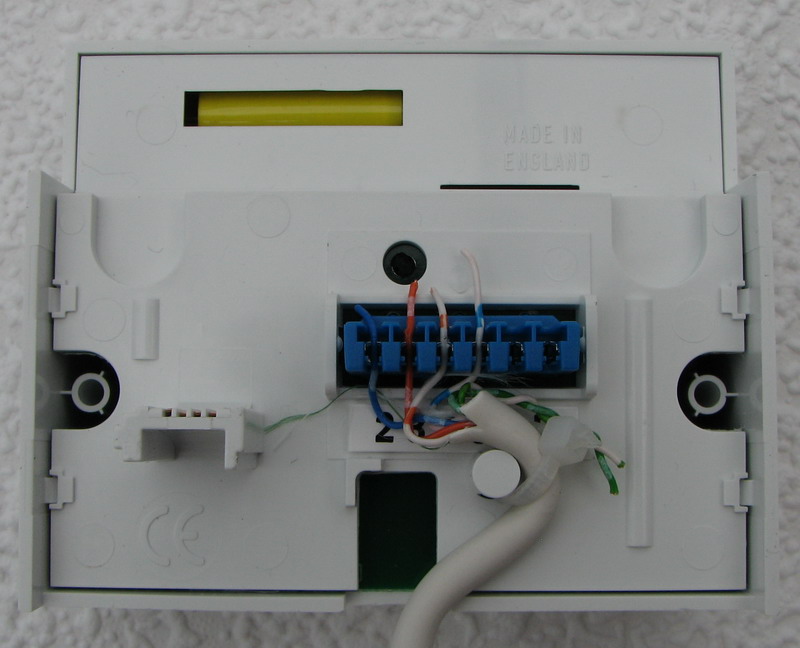 Click image for larger version This is the back of the ADSL faceplate, and shows the extension wiring connected again. The spare right hand connectors on the blue block are for connecting a dedicated ADSL extension. The BT supplied ADSL faceplate which engineers sometimes fit when investigating a faulty line do not have this option for an ADSL extension. |
 Click image for larger version The ADSL faceplate is then pushed onto the master socket. It will stand proud of the original socket by around 2cm due to the filter electronics the faceplate holds. There is no need for a micro-filter to be used in the phone socket. The ADSL socket is the one on the left and will accept an RJ11 plug (the one normally on an ADSL modem lead). |
What is the I-Plate?
Some places may call it an iPlate, but it stands for Interstitial Plate, which means the plate that fits in between.

The Original I-Plate, click picture for larger version

The Original I-Plate, click picture for larger version
Openreach shortly after the original interstitial plate was introduced added a version with a built in socket for a DSL modem. In addition there are A and B IDC terminals so that a dedicated data extension can be wired up if desired.
Can I fit an I-Plate?
Fitting an I-Plate is designed to be simple and does not require any changes to the telephone wiring in the home. Most people who can change a fuse will be able to fit an I-Plate. The sequence is laid out below:
- Identify your telephone master socket. This is normally the first socket on the telephone line entering the property, and will look like this.
- Check what type of master socket you have. If your master socket has Openreach branding in the top right corner the socket already features the I-Plate functionality.

Image showing Openreach logo from a master socket

Click picture for larger version - The I-Plate is designed to work with master sockets that have a BT or ‘piper’ logo on it, or if the socket was not fitted by BT there may be no branding on it.


- Check the type of screws used, and find the appropriate screwdriver.
- Undo the two faceplate retaining screws.
- Lift off the faceplate, being careful to not detach your extension wiring that is attached to this.
- Slide the extension wiring through the slot in the I-Plate and plug the I-Plate into the master socket.
- Plug the faceplate now into the I-Plate, and use the two screws supplied with the I-Plate to secure the faceplate.
- Remember the I-Plate does not remove the need for ADSL micro filters when plugging your ADSL modem and telephones back in.
How do I get an I-Plate?
Some broadband providers will order one for you upon request, or supply of part of their fault finding processes. There may be a charge for the I-Plate and/or delivery so check before asking for one.
A number of commercial outlets will sell you an I-Plate, which retails for around £10 to £20. If going to buy one, then for the small amount of extra hassle and cost you may find fitting an ADSL/VDSL2 faceplate to be neater, this reduces the impact of the ring wire, and also removes the need for micro filters on your telephones.
How much difference will the I-Plate make to my broadband speeds?
The I-Plate can improve some lines significantly, giving improvements of 4Mbps (4 Mega bits per second) for ADSL2+, the general rule is that the more telephone extensions you have and the closer to the exchange the larger the improvement is likely to be. The level of improvement from an I-Plate or faceplate filter is even higher on VDSL2 where some people have seen 15 to 20 Mbps gains if their connection was performing well what was expected.
You can determine what effect the I-Plate is likely to have by testing your broadband at the test socket that is revealed by removing the bottom half of your BT master socket, see picture below for where the test socket is located.
Click picture for larger version
What is inside the I-Plate?
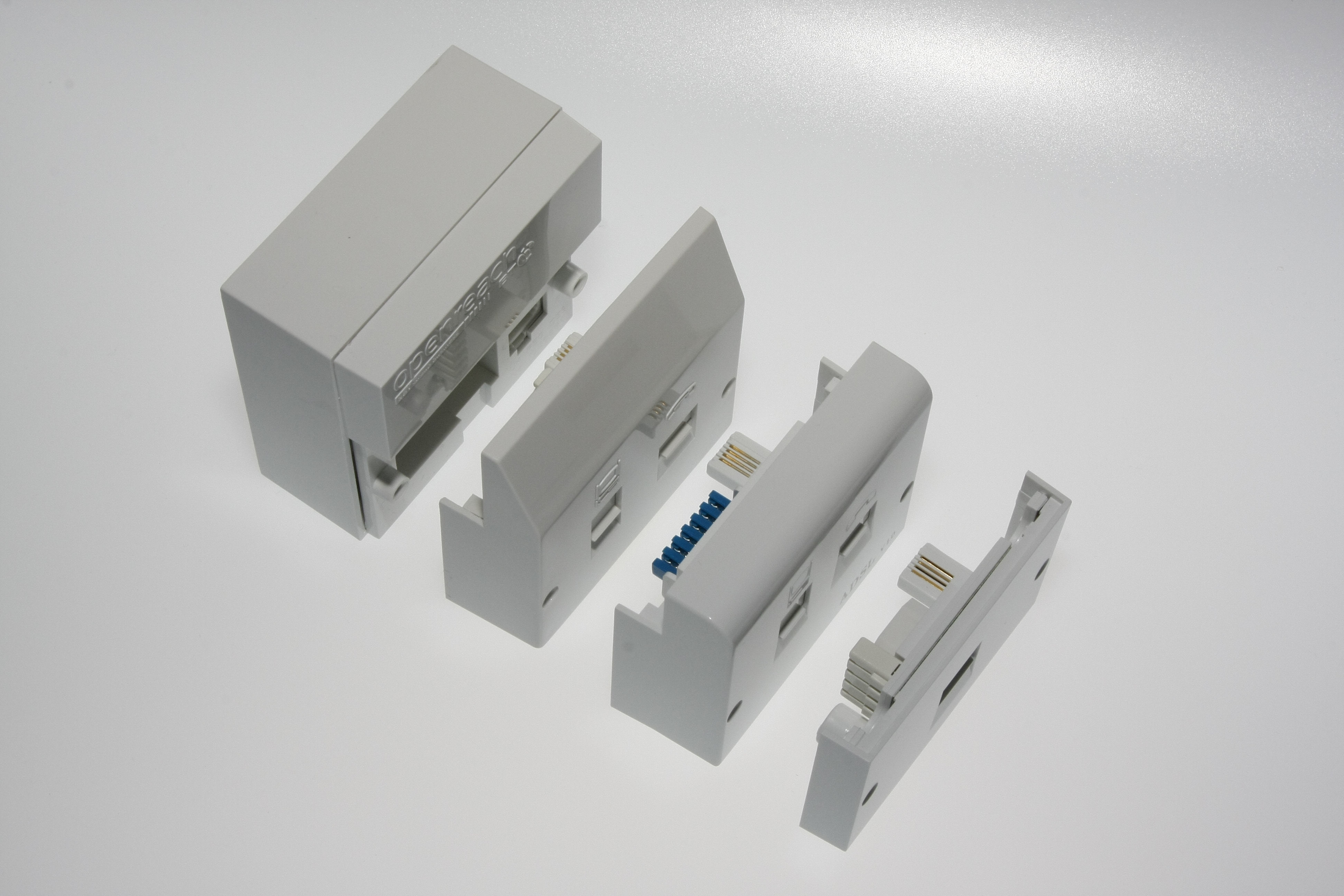
The I-Plate is actually a surprisingly simple device, we have dismantled one so you do not have to break your own.

The back of the I-Plate, click picture for larger version

The innards of an I-Plate, click picture for larger version
What is the Openreach NTE5c a tool-less master socket?
In 2016 Openreach released the 5c version of its master socket. This new faceplate and master socket replaces the existing 5a and is installed in new homes or where Openreach visit to fix a fault and the master socket gets upgraded.
The important point to note is that the new design is not compatible with the majority of aftermarket faceplate filters, the only one we know that works is the Openreach faceplate filter that simply plugs in just like the I-Plate.

Standard NTE5C master socket, click picture for larger version

Test socket on NTE5C master socket, click picture for larger version
I don’t want to spend any money, but want to improve my broadband connection?
The I-Plate while a nice and simple device, will cost many people money, and the simpler option of removing the ring wire from the master socket faceplate is a free option.
Master socket with removable section unscrewed
Click image for larger version
To disconnect the ring wire(s) lift the wire away from the metal conductor as shown below:
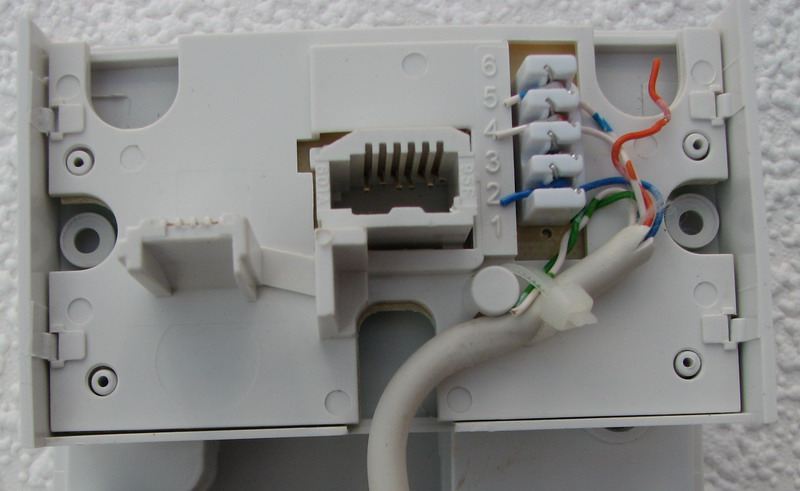
Faceplate with disconnected ring wire
Click image for larger version
NOTES:Where possible do not cut the ring wires, but lift them out of the connector, cutting them may leave you with too short a wire to reconnect when you move out of the property. If refitting a wire to connectors like those in the sockets, an IDC Krone tool must be used which can be purchased at stores that sell telephone extension kits (such as DIY stores) and also online.
This procedure of removing the ring wire is also useful if you do not have an identifiable master socket in the property.
I don’t have a master telephone socket, can I fit an I-Plate?
The short answer is no. The longer answer is that if you do not have one of the suitable master sockets, you can call your telephone line rental provider and request the fitting of a BT master socket (known as an NTE5). This carries a charge which your provider should be able to advise you about.
My main socket has two telephone sockets on it, will an I-Plate fit?
If you have a telephone socket that looks like this:
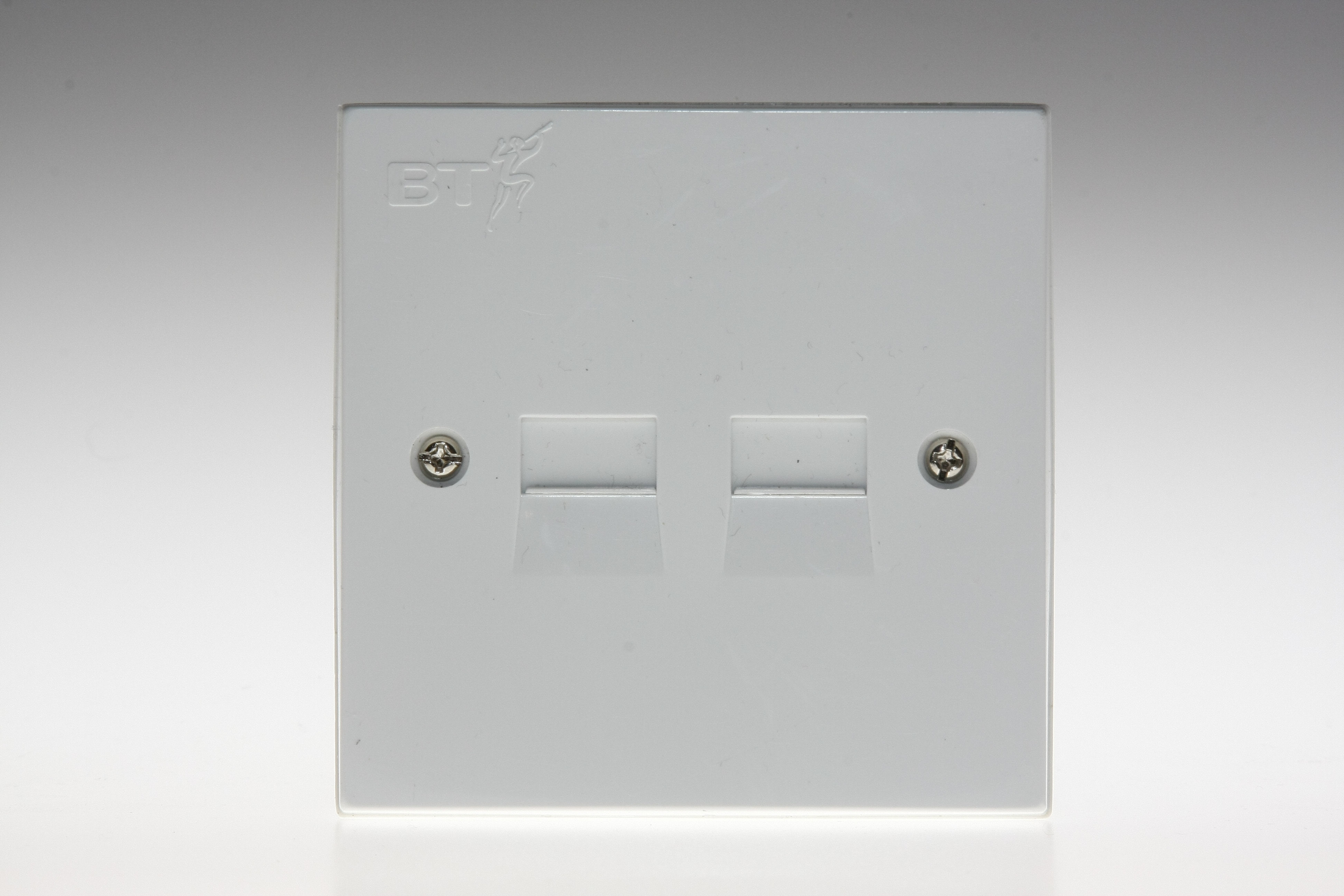
Dual telephone socket, click image for larger version
What is the difference with an Openreach branded master socket?
The master socket which has the Openreach branding looks identical to older versions of the master socket. The difference is actually in the removeable faceplate.

An Openreach master socket faceplate, click image for a larger version
My master socket does not have a split front to it, can I fit an I-Plate?
Older installations will have a master socket that was not designed to be accessed by the consumer, and thus does not have a removable faceplate. An example of this older style socket is shown below:

Old style master socket, click image for a larger version
I have moved home and the telephone is all in my name, but the online checkers say I cannot have broadband?
If the previous resident had broadband then do not panic, upon taking over a telephone line it can take the online checkers a few days to update.
Broadband providers should still be able to place an order if you explain the situation.
The online checkers say a very slow speed is available, but the previous resident got a lot faster?
The online checkers take time to update, sometimes a week or more when the person whose name the telephone line is in has changed. This can result in slow speeds being estimated on the online checkers.
If you can find out from the previous resident what their actual broadband speed was, you should be able to achieve the same.
The online speed estimators where you put in your telephone number or postcode do nothing to actually limit your broadband speeds. If the checker is wrong your broadband modem will still negotiate the best speed possible for the parameters that have been set.
My broadband provider is saying I need to pay them money before I can migrate, can they do this?
A short answer NO. A provider must allow you to migration even if you owe them money, of course ignoring any debt may serious implications in the future as providers may use a debt agency to recover monies owed.
If leaving a provider while within their minimum contract term you are liable for any charges as set out in the products terms and conditions and the notification letter when you initiate a migration should set these costs out. If the cost is too high you can cancel the migration.
If you have left a provider and dispute the charges they say you owe them, follow our resolving a problem guide.
I have moved, but my provider is telling me that someone is camped on my line, what do I do?
The phrase ‘camped on the line’ is used to describe a situation, where you have moved into a property and took over the telephone line, but the old broadband is still active.
Your broadband provider should wait three days for the tag to clear and place a broadband order after this. If the tag fails to clear then given proof that you have taken over the telephone line they will arrange for the old broadband to be removed.
How do I find out which broadband provider the previous resident was with?
Prior to 2008 you would have to chase the old broadband provider yourself, or contac the TAGS helpline directly. In 2008 the systems have altered to make things simpler, and now it is the job of your new broadband provider to chase this situation up, and remove the old broadband service.
I want to change my telephone line rental provider, will this affect my broadband?
Switching the company who you pay your telephone line rental to will not affect the broadband, provided that the broadband and telephone are not a fully unbundled service (e.g. TalkTalk and Sky).
To move line rental provider, simply contact the new provider. One note of caution, if this new provide has telephone and broadband bundles make it clear that you DO NOT want their broadband. They should not be able to remove your broadband, unless it is a fully unbundled product, and even then they should have your permission.
Be aware that some providers who sell telephone and broadband as a bundle while they will technically allow you to move the broadband elsewhere may charge a supplement on the broadband fee if you move the telephone service away, supplements of £2.50 to £5 per month are not uncommon.
I am moving into a home with no telephone line, and TalkTalk say I have to call BT to get a line installed, won’t this be expensive?
The price for a brand new line varies, from free to a worst case figure around £125, though very few people seem to pay the higher amount, around £60 is more common.
All the providers who sell telephone and broadband bundles should be able to order the install for a new telephone, though be aware that it can take several weeks for the install to take place, so if moving into a new property don’t leave ordering the telephone and broadband to the last minute.
I want to switch broadband providers how do I do it?
Switching providers is commonly known as a migration, and for the vast majority of broadband providers (namely those using ADSL, ADSL2+ or FTTC) it is very simple.
New rules that come into effect on 20th June 2015 mean that you should just need to order the service from your chosen new provider and they will contact your old provider.
Your old provider will send you a letter to confirm that you are happy to migrate and this gives you 10 days to reply and cancel the migration, i.e. to avoid a rogue sales person slamming your connection.
How quickly should I get my Migration Authorisation Code (MAC)?
After 20th June 2015 anyone trying to issue or obtain a Migration Authorisation Code is out of luck. A new migration system has made the old MAC obsolete.
Our Migration Guide is worth a quick read and outlines the new process which is generally much simpler than the old system.
What are the rules governing migrations?
In February 2007 Ofcom announced General Condition 22, which provides rules for how migrations should take place.
How do I know if I need a MAC to migrate?
Easy question, no needs a MAC to migrate after June 2015, the MAC system has been abolished.
The new migration system is controlled by the provider you are trying to switch to, and they or their wholesaler will inform your old provider, making migrations much simpler if you are leaving your old provider because you are not happy with the service.
I think I am on an unbundled connection, can I get a MAC?
Now that a unified migration system is in place no broadband service needs a MAC to migrate, just contact the new provider you want to join.
My broadband provider is asking whether I’d like to cease my broadband connection when I ask about migrating, what do I do?
The broadband provider should avoid ceasing a broadband line at all costs, and suggesting this method rather than a migration is not the best practice.
A cease order will result in broadband being removed from your telephone line, and may lead to a delay of a week or more in getting broadband back again.
Ceases used to be free, but to encourage broadband providers to use migrations they are now charged £18.50 for every cease, and some providers pass this cost onto you.
I have a fully unbundled service, but want to switch broadband providers, what do I do?
The key thing to remember is that with a fully unbundled service both the broadband and telephone products are unbundled. This has previously often made switching provider difficult.
The changes in the broadband migration process mean so long as you are switching both phone and broadband to the same provider or you need to do is contact the new provider. If moving telephone and broadband to two different providers things are a little more complex as you need to get a Linked Order Reference Number added to the orders to ensure that the wholesalers are away that this is a linked order. Your chosen operator should help you with this.
I am moving out of my home and want broadband as soon as possible in my new home, what do I do?
The first thing to decide is whether you want to use your existing broadband provider at your new home. If you do not then what you should do is tell your old provider to cease your broadband by the date you are due to move out, and then order broadband from new at the new property. If you do the alternative of moving your old provider to the new home and them migrating you may find yourself stuck in a lengthy contract, and the probability of it going wrong are much greater.
The process for ordering broadband and a telephone line at a new home (this process applies even if the new home does not have an active telephone line) is outlined below:
- Liase with existing occupier and make sure they have arranged to move their own broadband or will be ceasing it. This avoids what are known as TAG issues.
- Contact your new provider(s) and link the telephone and broadband orders by using the Simultaneous Provide process.
- When using a Simultaneous Provide you will be given a Linked Order Reference Number (LORN) and you should give this to the other new provider, i.e. if your telephone provide gives you the LORN give it to your broadband provider when placing the order.
- VERY IMPORTANT: It is important that when you first place the order with each provider that you ask for the Linked Order Reference Number, once an order has been placed you cannot link the two orders together.
- When you move in the telephone line will usually be up and running first, but there is a risk the broadband order will fail and this is likely if the previous resident did not move or clear their broadband from the line.
- If the broadband order fails, the broadband provider should wait three days and check whether the old TAG has cleared from the line and if it has not the broadband provider is responsible for liasing with the TAGS helpdesk to resolve the tag.
I have been given my new telephone number, but the availability checkers say my broadband will be very slow?
Until a telephone number is actively in your name at an address it will not provide accurate estimated broadband speeds.
If possible obtain the telephone number of the line that is in use at the property currently, or ask them what speeds their broadband connects at.
 Test your broadband speed
 Follow us on X for the latest broadband news