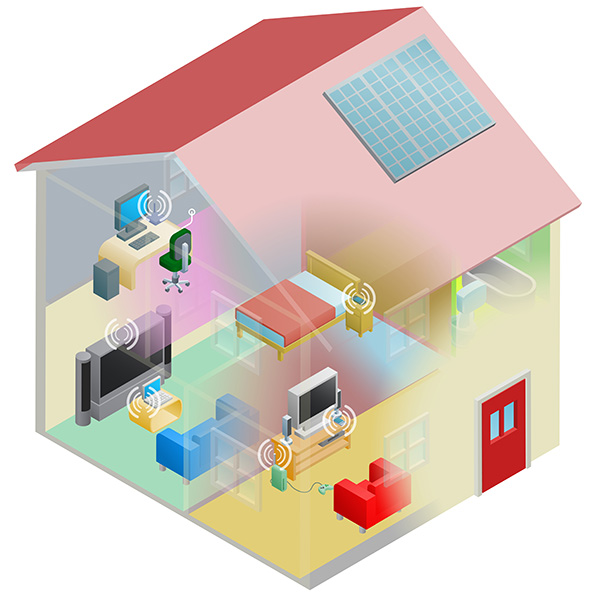
In today’s world, the ‘Internet’ is not simply something you use on a computer; it has become part of every-day life both in the home and on the move.
Most of us want to connect many devices to our home network to enable them to be linked together and help us in our daily lives. Many devices in the home will connect using wireless (or “wi-fi”) connections whilst others will connect using an Ethernet cable. A few devices may have SIM cards (e.g. mobile phones and tablets) that connect to the mobile networks.
You might need to extend the range of your wireless or wired network to let you connect everything in your home as you need
Planning
It’s important to plan your home network before deciding which technology or combination is best for you; you don’t want to pick one and purchase the equipment only to find it doesn’t have enough range or flexibility. Make a list of the devices you want to include in your network and have a think about where they will be located in your house, particularly if you were thinking of having a wired network. Check down the list and have a look at which devices will need to adapters (mentioned later) if you’re thinking of choosing a wireless network.
Types of Networks
The three most popular types of network for the home are wired, wireless and powerline.
Wired home networks require all devices to be connected via Ethernet cables to your broadband router. This option is often best if your equipment is near the router. Your devices will require an Ethernet port, which rules out most smartphones and tablets. Other devices (e.g. Nintendo Wii) may require an additional Ethernet adaptor to be connected this way. If you have a streaming media player connected to your TV the best streaming experience will be obtained by using an Ethernet cable.
Wireless allows the devices to be connected via Wi-Fi, which is needed for smartphones, tablets and a perfect solution both for laptops, many games consoles and if you want to connect many devices without running cables. A wireless network will require a central router and almost all the broadband providers supply a home gateway that connects to the broadband and also offers wireless connectivity, if not you can usually add a separate wireless access point. You will also need to bear range in mind when considering a wireless network.most will cover a reasonable area; there are some exceptions and limits, so it’s best to talk to your broadband provider for advice.
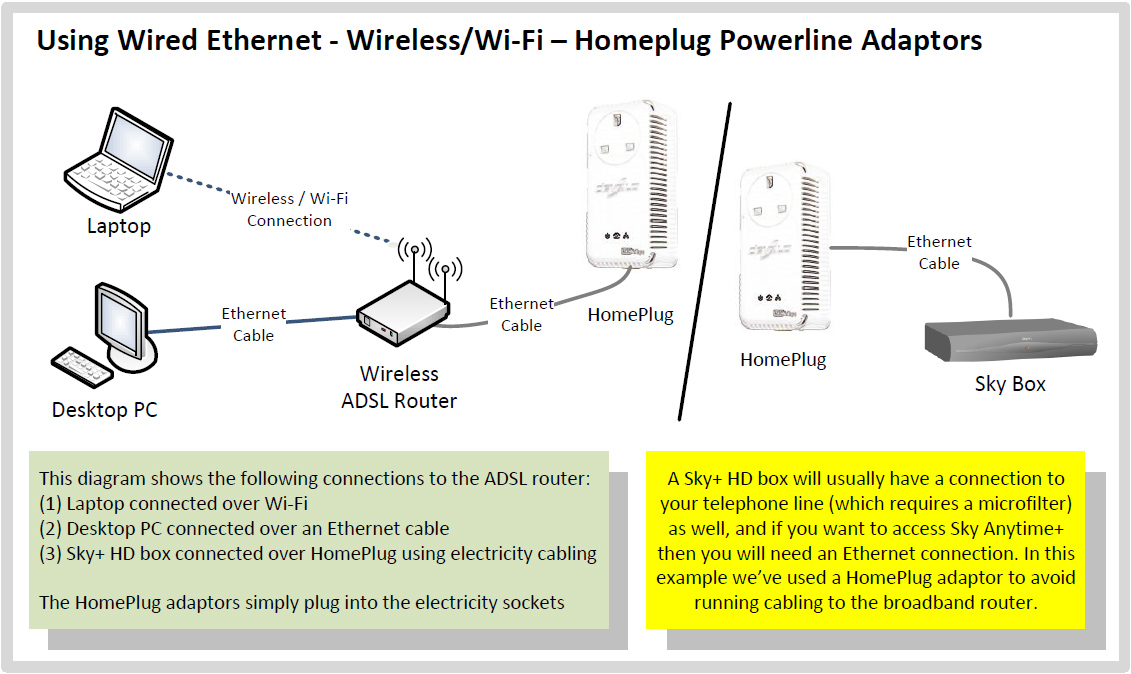
Powerline networking is a type of connection which uses your electrical cabling and power sockets to build a network inside your house. You would need a powerline adaptor for each device you want to connect as well as your broadband router. Each adaptor has an Ethernet connection so you will also require an Ethernet cable and an Ethernet socket on the devices you’re connecting. It is an ideal solution if you need to connect a device with an Ethernet socket (e.g. Sky HD box for Anytime+) without running cabling through your home. Powerline networking supports various speed standards but it is important to remember that the further apart the powerline devices are the slower the link is likely to be.
You can run a combination of some or all of the above technologies depending on your requirements.
You may also want to install a home networking kit yourself. This usually means configuring the connections yourself, although these days. providers have made this task much easier and user friendly.
Wired Ethernet
Wired networks use Ethernet connections between your devices and the router over a Cat5e or Cat6 cable. Although you can buy these cables in many DIY or electronics stores and even supermarkets, they are usually very expensive as compared to buying them online, so do shop around. Your router may also come with one or more cables included. Ethernet cables can be up to 100 metres long, and there is no significant difference between the cheapest cable and high quality cables unless you’re experiencing significant interference, so we would recommend you go with the cheapest (hint: just search ‘cat5e’ cable. on Amazon.co.uk). There is no such thing as a ‘high speed’ Ethernet cable so don’t be fooled into paying over the odds.
One of the main advantages of a wired network is its reliability. You will find that most computers connect to your router at 100Mbps or increasingly 1 Gbps (1000 Mbps). This is particularly helpful if you’re on a ultrafast broadband Cable or Fibre service.
The down-side is that you need to run Ethernet cables between all your devices (unless you combine technologies). Some new laptops such as the MacBook Air-series, do not have built in wired Ethernet adaptors so you may need to buy one, as indeed for some games consoles.
When buying cables, make sure you don’t buy ‘crossover’ cables. These are used between two computers, rather than between a router/switch and a computer. Most cables will be standard ‘straight’ cables, so you’re unlikely to have any problems.
If the router supplied by your broadband provider runs out of Ethernet ports (most support 4 cables connected) you can easily add an Ethernet switch for around £10 to £20 thus increasing the number of Ethernet devices you can use on your connection.
Finally, if you want to have a wired network and you’re rewiring your house with new electricity cables, consider putting in structured Cat6 wiring, as this allows you to run them neatly under the floorboard. Do however get advice to ensure you run them to a point away from electrical interference such as a boiler or hot water tank.
Wireless LAN (Wi-Fi)

Wireless LAN is a great idea for home networking if you want to be able to move freely around your home with your devices, such as a laptop or tablet. The most popular wireless specifications used for home networking today is 802.11n. Some very old devices may only support 802.11b or 802.11g, whilst the newest devices will support 802.11ac. The difference between these is the theoretical speed they can support:
| Standard | Theoretical Maximum Speed |
|---|---|
| 802.11ac | 1300Mbps |
| 802.11n | 450 Mbps |
| 802.11g | 54 Mbps |
| 802.11b | 11 Mbps |
Do remember that these speeds are theoretical maximums, and you may well find the speed drops significantly the further you move from your broadband router or wireless access point. With today’s broadband connections, if you’re using 802.11b, and even 802.11g, you may well find the wireless network in your home becomes a choke point in terms of speed. If you have a particularly large home, or one that has thick walls or spaces between floors, you may consider extending your wireless network.
The majority of routers supplied by your ISP today will come with both an Ethernet port and Wi-Fi built in, but do check if yours has both.
Depending on your device, you may need to get a Wi-Fi adapter in order to connect to the network. Most laptops and notebooks will come with a built in adapter, however desktop PCs may not and Internet enabled TVs may also require an adapter. Please remember to check the compatibility of your device with any adapters you buy, as not all will match.
For help and advice on setting up wireless routers, check our router reviews section. Also, please read our wireless network security section below.
Powerline Networking

Powerline networking is great for homes where wired networking is not a viable option and wireless is impractical, for example due to thick walls or longer distances. HomePlug adaptors are used in existing power sockets to connect computers and other devices to your broadband router. As Powerline networking does not require any new wires, it can be a very cost efficient way to run your network. Although the adaptors do require electricity to run, they don’t substantially add to your electricity bill. It’s worth mentioning at this point, that although it is convenient to run networks through sockets already supplied, if you choose this option you will need to make sure encryption is turned on. This is because the signal from the HomePlug may run outside your home or business, and can be tapped in to by others close by with a HomePlug. You should also note that HomePlugs should not be connected to surge protectors and power strips, as this will weaken the network signal emitted by the HomePlug adaptor. Turning on encryption is often a very simple step of pressing a button on the side of the adaptor, but please refer to the user manual that comes with your devices. Remember that you can connect more than two devices this way.
One caveat with Powerline networking is that they need to be connect on the same ring main. Modern electrical installs tend to run on separate ring mains. You may find this still works, but at lower speeds.
Wireless Network Security
It’s essential to consider security when setting up a network, particularly one where you will be potentially sharing your personal details between devices. This is particularly important if you are running a wireless network as you need to ensure it cannot be used by neighbours or passers-by who could download pirated content from the Internet, leaving you to explain why this has happened from your broadband connection.
There are different types of encryption you can implement to ensure your wireless network is safe. Some older devices only support encryption mechanisms which are now out-dated and can easily be compromised, such as WEP.
We would strongly advise that you do not use WEP encryption on your wireless network and update any devices which do not support WPA/WPA2 encryption. You should always use WPA/WPA2 encryption.
The newest and most popular form of encryption is WPA2 (Wi-Fi Protected Access), which scrambles the encryption key to outside devices. This is the most secure encryption and should be used on all devices in your home. Check your router setting on your PC to make sure encryption is activated. You will be asked for the encryption key every time you add a new device to your network so please make sure you keep a record of it. It should be relatively long and difficult to guess (i.e. not a maiden name or pets name). .
Each device that connects to a wireless network has a unique identifier called a MAC address, which is 12 characters long (often separated in groups of two or four by dots or colons depending on formatting). You can configure most wireless routers to only allow certain devices with the address you provide to connect. This is normally called ‘MAC filtering’ in your router configuration. You can find the MAC address of your device by following these instructions. MAC filtering does not however protect your network from unauthorised access by someone with basic technical skills, so we recommend you use WPA2 encryption.
Extending your wireless network
If you have a large house or an old house with thick walls, you may find that the wireless signal is weak in some areas. One solution is to extend the wireless network, either by connecting additional wireless access points with physical cabling back to each other, or by using Wireless Distribution System (WDS) which allows your wireless access point to act as a ‘repeater’ strengthening the signal. You need to ensure all routers or wireless access points in your home support WDS or equivalent protocol. Another option is to deploy powerline adapters to link additional wireless access points back to your broadband router.